Clearly these people were thinking clearly and knew where
to go and what to do when they got there! Miral is right, they
are a perfect fit to the Empire.
Ah yeah… Some entiled beyatch is getting a HARD lesson from
Teresa AND the King and Queen when this major goes home!
Sounds to me like someone misses being a lieutenant! It makes
me wonder if this was a set up from the start, to give a certain
royal pain her lesson for the year.
PC, when I told my son about the 2TB SSD HD he wanted
the link as well, so bless his heart there’s 2 of them
due next week! It’s been ages since I last replaced a
C: drive, so if I’m gone a bit I’m not ghosting everyone,
I’m just having issues with it.
Western Digital has free downloadable Acronis disk clone software,
it works as long as one of the disks is a WD.
It’s really simple, you connect your new drive to your computer,
install the Acronis software to your C:drive,
start it and follow the directions.
You can connect the new drive with a USB adapter or with SATA
power and data cables, it doesn’t matter.
Once you’re done, swap drives and power your computer up. It
shouldn’t be down for more than half an hour. When I upgrade
a computer like this, I usually leave the old drive in place,
but unconnected, just in case I need to swap back for some
reason. Or use it for additional storage. https://crystalmark.info/en/download/
Crystal Disk Mark and Crystal Disk Info. They’re both free,
CDM will tell you how fast your drives are, and CDI will
tell you what shape they’re in, so you can get an idea of
how much longer they’ll last.
I would run both on your old drive just to see, and to
compare the speeds with the new one. You’ll really see a
difference in boot up times and load times for your
programs! Adding an SSD is the #1 way to breathe new life
into an old computer.
I used an old generic drive swapper, it took a “snap shot”
of the old drive and pasted it onto the new drive. But that
was for Windows ’98, so I doubt it would work for 10.
When I started to use XP, I didn’t run into the situation
like this. So I never upgraded from the FAT32 file system.
I have a Sandisk SSD in my system now, but it’s only a 240gb.
So I doubt it’ll be a faster HD, just more space for things.
The real concern is while it’s a 240, there’s only 225
available, meaning the reinstall for the OS is on a partion
on the C: drive, I’ve never dealt with that before.
Sounds like you might have to do a fresh install of Win10
on the new drive and transfer the other files over.
Or just keep your old files on your current SSD and add
any new stuff to the new one as you go along.
Or some combination of the two.
President Elect Toxic Deplorable Racist SAH Neanderthal B Woodman Domestic Violent Extremist SuperStraight
“Fresh install of Win 10″…..riiiiight.
Only if you can get/find/buy a copy (from MS?).
MS is pushing the Win11 hard & heavy now.
I keep getting these silly little popups/messages,
“It’s time to update to Win 11. Let’s update and check your
current computer. Oops! Sorry. Can’t do that with your
current computer. Maybe time to buy a new computer?
Click here for our easy rates and terms.”
Windows. The worst virus to ever infect a computer.
And I thought AOL was bad.
Maybe it’s time for me to learn and install Linux.
My wife and I both got the “we’re going to stop supporting
Windows 10 in October of 2025.” Yeah, both our computers
are fairily old and could probably stand replacing. I hate to do
it. Who knows? At my age, a year and a half from now isn’t
all that assured. I wonder what kind of arm twisting Windows
will do between now and then. An update that crashes the
system, maybe?
President Elect Toxic Deplorable Racist SAH Neanderthal B Woodman Domestic Violent Extremist SuperStraight
“Stop supporting” only means that they’ll no longer do updates,
or additional virus protections, etc.
It doesn’t mean that it will disappear, crash-and-burn,
or stop working.
If you don’t want to update to Win11, you can continue to
enjoy your Win10 for many more years.
I have an old laptop with Win7 on it, it works just fine.
BUT….I’m thinking of retiring it, some websites are no
longer backwards compatible.
Fortunately my MB is missing some hardware to support W11. IMS when
I first started getting those “warnings” I went to M$ and used a
tool there to check W11 compatibility. Since then I haven’t gotten
any more “warnings”.
My MB is old but entirely functional. Besides I totally do not have
the money to buy a new computer.
The Win10 ISO is still available from Microsquiff for free. https://www.microsoft.com/en-us/software-download/windows10ISO
Reinstall should be easy as long as you have your original product key.
Belarc Advisor will tell you every product key on your computer,
I would make a hard copy of every one first.
I kept all the documents in the box that the tower
came in, but I don’t remember seeing a P-code,
cross fingers gang! They aren’t here yet, I’m just
getting ready.
I have already checked, I have 2 SSD and HD power cables
included, so that’s not an issue, Ill just have to reassign the
drive letters once the transfer is done, I just hope it’s much
faster process than the last time I did this! But that was from
a 8 gig to a 16 in FAT32.
Regarding the top comc;
I think we just found our Special Forces Academy.
As to the bottom comic;
Yeah, I ran I to my share of officers who thought that just
because of their rank, they were above the rules and everyone
should bow down to them. Mostly, Academy pukes on their first
cruise, who had less authority than the lowest enlisted.
Yeah, the division officers took them down a few pegs…
Will that process work with the new SPX Dell 8690 with
Windows11 I now have – Status post-crash and partial
recovery – and took my Acronis 2015 with it.
My w10Pro apparently self-corrupted during serial update(s) . . .
Is there a way to create an additional drive partition
without a reformatting?
thnx
I’m not PC but if I remember right, yes, IF there is NO
data in the area that you want to part out. That’s very tricky
to do, you might want to go to a site like http://www.filehippo.com
or cnet.com and look for a hard drive partitioning tool.
A decent one will take care of that issue for you. Keep in
mind, when your computer writes to a hard drive, it doesn’t
care where on the drive it puts data, that’s why you have to
defrag them from time to time.
To partition an existing hard drive, you can follow these steps:
Locate the target partition.
Select “Resize/Move”.
Extend the target partition by dragging the partition panel
rightward or leftward to add the unallocated space into your
current partition and click “OK” to confirm.
Alternatively, search for Disk Management in the Windows search bar,
select Create and Format Hard Disk Partitions, or use the Windows
Power User menu (Windows key + X) and select Disk Management.
Select the hard drive you wish to partition.
Shrink an existing drive to create unallocated space.
Create a new drive from the unallocated space.
To increase the size of an existing drive,
delete an unused drive and extend the volume of another drive using
the unallocated space.
To find Disk Management,, right-click on “This PC”
(Image of a computer on your desktop),
then go down and click on “Manage”.
In the window that opens, click on Storage/Disk Management,
and you’re there.
Found it – looked it over and realize how far over my head that is.
I closed it to back out and hopefully not screwing up my machine.
I did learn I have a Wester Digital SSD ~ 1TB on board.
and the 2TB Samsung T7 Shield SSD.
Not really sure what to do with the four “Recovery” (Disk 0 Partitions 1,4,5,6)
answer: nada, nothing, zip.
Wow – never heard of these “tiny” PCs.
So. Much. To. Learn.
OK, Color me terrified. . . . and totally impressed with you guys.
(my programming chops are dated to 1973 on IBM 360, Mod 20 . . . )
The Lady Bear has a Lenovo laptop. Will research these.
Geeze I wish you lived here in town, PC.
. . . . . . . . . .
To the “Gestapo” Major:
Both hands on the right rear fender Ma’am, Feet back and spread ’em.
😀
English dubbed and it seems complete, the live action
version. I knew it existed, by dumb luck I found it: https://www.youtube.com/watch?v=I9OP96UxilA
The only decent one I remember…
President Elect Toxic Deplorable Racist SAH Neanderthal B Woodman Domestic Violent Extremist SuperStraight
Shows how much I haven’t been paying attention.
I never knew there was a live action version.
The only one I was aware of was the (70s?) anime series.
Thx for the link. I’ll watch it later.
I never looked into sequels, I thought the ship was destroyed at
the end. I remember the Captain ordering everyone off and he died
in the final fight when the ship went down. But that was 30 years
ago and I’ve slept since then 😛
as with ANY media (tv, movies, comics/manga…)
Even proof of a body does NOT mean dead.!
IF they “Think” there is money in it,
they will drag it back.!!
(or,, the fans yell for it,. [Spock, Harley Quinn])
True, but since the anime craze hadn’t really kicked in yet,
plus having an “expert” in the family, if there was one I
thought I’d hear about it asap. But then again, puberty had
kicked in and he was into Sailor Moon by then heh.
heh,, don’t i know.. “expert”: and ‘Sailor Moon’.
my one sister was ‘Heavy’ into Nipponese.
at a young age (early 1971) she self taught her
an me (by default,. she Had to have some one to
talk to.) the language an culture.. IE: did you
know, there were female Samurai (Onna-Musha
or later Onna-Bugeisha)
I have one, that’s what I’m typing this on.
Mine has a 2TB SSD and a 2TB NVME drive, with a 5TB USB HDD.
They don’t use much power, and put out little heat.
I’ve just been cruising ebay, and the Dell and Lenovo Tinys can be pretty cheap.
I’ve always preferred the intel 7000-8000 processors anyway, and the “T” series
use very little power.
You might consider letting your wife keep the laptop…
(Just steal one of the RAM sticks, the Tinys use laptop RAM.)
I’m building a NAS with an I7-7600T processor now for low power and low heat.
Be SO much easier for updates and firmware
management if I didn’t have to setup the
printers on my bed so I can jack them in. Plus
i can leave it plugged in and network to this
pc so I don’t have to hover over the printers
during a tricky print, I’m getting sick of having
the print heads trashed because of a failure.
Just make sure they’re complete. Some people sell
them without the OS or even a hard drive/SSD,
or even a power brick.
(They use external power supply like a laptop).
A low price isn’t worth it if you have to buy extras.

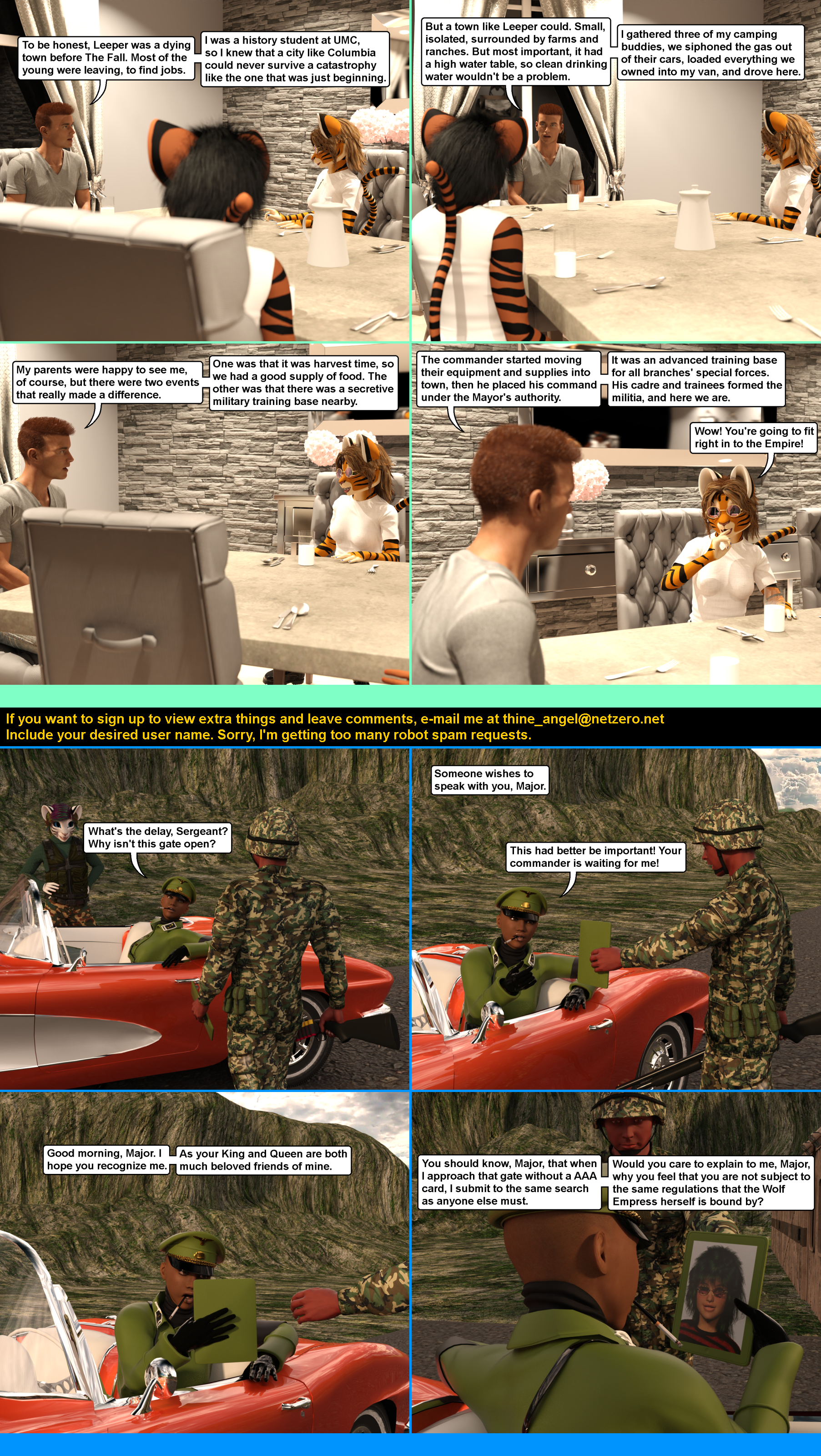

Regarding the bottom story: Oops!
Clearly these people were thinking clearly and knew where
to go and what to do when they got there! Miral is right, they
are a perfect fit to the Empire.
Ah yeah… Some entiled beyatch is getting a HARD lesson from
Teresa AND the King and Queen when this major goes home!
Sounds to me like someone misses being a lieutenant! It makes
me wonder if this was a set up from the start, to give a certain
royal pain her lesson for the year.
PC, when I told my son about the 2TB SSD HD he wanted
the link as well, so bless his heart there’s 2 of them
due next week! It’s been ages since I last replaced a
C: drive, so if I’m gone a bit I’m not ghosting everyone,
I’m just having issues with it.
Western Digital has free downloadable Acronis disk clone software,
it works as long as one of the disks is a WD.
It’s really simple, you connect your new drive to your computer,
install the Acronis software to your C:drive,
start it and follow the directions.
You can connect the new drive with a USB adapter or with SATA
power and data cables, it doesn’t matter.
Once you’re done, swap drives and power your computer up. It
shouldn’t be down for more than half an hour. When I upgrade
a computer like this, I usually leave the old drive in place,
but unconnected, just in case I need to swap back for some
reason. Or use it for additional storage.
https://crystalmark.info/en/download/
Crystal Disk Mark and Crystal Disk Info. They’re both free,
CDM will tell you how fast your drives are, and CDI will
tell you what shape they’re in, so you can get an idea of
how much longer they’ll last.
I would run both on your old drive just to see, and to
compare the speeds with the new one. You’ll really see a
difference in boot up times and load times for your
programs! Adding an SSD is the #1 way to breathe new life
into an old computer.
I used an old generic drive swapper, it took a “snap shot”
of the old drive and pasted it onto the new drive. But that
was for Windows ’98, so I doubt it would work for 10.
When I started to use XP, I didn’t run into the situation
like this. So I never upgraded from the FAT32 file system.
I have a Sandisk SSD in my system now, but it’s only a 240gb.
So I doubt it’ll be a faster HD, just more space for things.
The real concern is while it’s a 240, there’s only 225
available, meaning the reinstall for the OS is on a partion
on the C: drive, I’ve never dealt with that before.
Sounds like you might have to do a fresh install of Win10
on the new drive and transfer the other files over.
Or just keep your old files on your current SSD and add
any new stuff to the new one as you go along.
Or some combination of the two.
“Fresh install of Win 10″…..riiiiight.
Only if you can get/find/buy a copy (from MS?).
MS is pushing the Win11 hard & heavy now.
I keep getting these silly little popups/messages,
“It’s time to update to Win 11. Let’s update and check your
current computer. Oops! Sorry. Can’t do that with your
current computer. Maybe time to buy a new computer?
Click here for our easy rates and terms.”
Windows. The worst virus to ever infect a computer.
And I thought AOL was bad.
Maybe it’s time for me to learn and install Linux.
My wife and I both got the “we’re going to stop supporting
Windows 10 in October of 2025.” Yeah, both our computers
are fairily old and could probably stand replacing. I hate to do
it. Who knows? At my age, a year and a half from now isn’t
all that assured. I wonder what kind of arm twisting Windows
will do between now and then. An update that crashes the
system, maybe?
“Stop supporting” only means that they’ll no longer do updates,
or additional virus protections, etc.
It doesn’t mean that it will disappear, crash-and-burn,
or stop working.
If you don’t want to update to Win11, you can continue to
enjoy your Win10 for many more years.
I have an old laptop with Win7 on it, it works just fine.
BUT….I’m thinking of retiring it, some websites are no
longer backwards compatible.
Fortunately my MB is missing some hardware to support W11. IMS when
I first started getting those “warnings” I went to M$ and used a
tool there to check W11 compatibility. Since then I haven’t gotten
any more “warnings”.
My MB is old but entirely functional. Besides I totally do not have
the money to buy a new computer.
The Win10 ISO is still available from Microsquiff for free.
https://www.microsoft.com/en-us/software-download/windows10ISO
Reinstall should be easy as long as you have your original product key.
Belarc Advisor will tell you every product key on your computer,
I would make a hard copy of every one first.
I just downloaded a copy, for future use if needed.
I already have one on a different USB stick,
but you never know…
I kept all the documents in the box that the tower
came in, but I don’t remember seeing a P-code,
cross fingers gang! They aren’t here yet, I’m just
getting ready.
I have already checked, I have 2 SSD and HD power cables
included, so that’s not an issue, Ill just have to reassign the
drive letters once the transfer is done, I just hope it’s much
faster process than the last time I did this! But that was from
a 8 gig to a 16 in FAT32.
Just check Acronis and see if it works for you.
I d/l it and the instruction PDF,
i’ll study it completely before attempting.
What do you use your computer for?
Other than annoying you guys? Cad and slicing.
and taking a break on YouTube or Paramount+.
And I play games as well, just not as much as I once did 😛
Regarding the top comc;
I think we just found our Special Forces Academy.
As to the bottom comic;
Yeah, I ran I to my share of officers who thought that just
because of their rank, they were above the rules and everyone
should bow down to them. Mostly, Academy pukes on their first
cruise, who had less authority than the lowest enlisted.
Yeah, the division officers took them down a few pegs…
A major ought to be long past being “an Academy puke”.
Yes, they should be. But they often aren’t.
You’d think the same of colonels too…
Don’t ask…
Petercat –
Will that process work with the new SPX Dell 8690 with
Windows11 I now have – Status post-crash and partial
recovery – and took my Acronis 2015 with it.
My w10Pro apparently self-corrupted during serial update(s) . . .
Is there a way to create an additional drive partition
without a reformatting?
thnx
I’m not PC but if I remember right, yes, IF there is NO
data in the area that you want to part out. That’s very tricky
to do, you might want to go to a site like http://www.filehippo.com
or cnet.com and look for a hard drive partitioning tool.
A decent one will take care of that issue for you. Keep in
mind, when your computer writes to a hard drive, it doesn’t
care where on the drive it puts data, that’s why you have to
defrag them from time to time.
To partition an existing hard drive, you can follow these steps:
Locate the target partition.
Select “Resize/Move”.
Extend the target partition by dragging the partition panel
rightward or leftward to add the unallocated space into your
current partition and click “OK” to confirm.
Alternatively, search for Disk Management in the Windows search bar,
select Create and Format Hard Disk Partitions, or use the Windows
Power User menu (Windows key + X) and select Disk Management.
Select the hard drive you wish to partition.
Shrink an existing drive to create unallocated space.
Create a new drive from the unallocated space.
To increase the size of an existing drive,
delete an unused drive and extend the volume of another drive using
the unallocated space.
To find Disk Management,, right-click on “This PC”
(Image of a computer on your desktop),
then go down and click on “Manage”.
In the window that opens, click on Storage/Disk Management,
and you’re there.
Found it – looked it over and realize how far over my head that is.
I closed it to back out and hopefully not screwing up my machine.
I did learn I have a Wester Digital SSD ~ 1TB on board.
and the 2TB Samsung T7 Shield SSD.
Not really sure what to do with the four “Recovery” (Disk 0 Partitions 1,4,5,6)
answer: nada, nothing, zip.
Wow – never heard of these “tiny” PCs.
So. Much. To. Learn.
OK, Color me terrified. . . . and totally impressed with you guys.
(my programming chops are dated to 1973 on IBM 360, Mod 20 . . . )
The Lady Bear has a Lenovo laptop. Will research these.
Geeze I wish you lived here in town, PC.
. . . . . . . . . .
To the “Gestapo” Major:
Both hands on the right rear fender Ma’am, Feet back and spread ’em.
😀
English dubbed and it seems complete, the live action
version. I knew it existed, by dumb luck I found it:
https://www.youtube.com/watch?v=I9OP96UxilA
The only decent one I remember…
Shows how much I haven’t been paying attention.
I never knew there was a live action version.
The only one I was aware of was the (70s?) anime series.
Thx for the link. I’ll watch it later.
https://animension.to/search?search_text=yamato
Heh. Two pages. There were sequels, and they are dubbed.
Animension is a good place to be get lost.
I never looked into sequels, I thought the ship was destroyed at
the end. I remember the Captain ordering everyone off and he died
in the final fight when the ship went down. But that was 30 years
ago and I’ve slept since then 😛
as with ANY media (tv, movies, comics/manga…)
Even proof of a body does NOT mean dead.!
IF they “Think” there is money in it,
they will drag it back.!!
(or,, the fans yell for it,. [Spock, Harley Quinn])
True, but since the anime craze hadn’t really kicked in yet,
plus having an “expert” in the family, if there was one I
thought I’d hear about it asap. But then again, puberty had
kicked in and he was into Sailor Moon by then heh.
heh,, don’t i know.. “expert”: and ‘Sailor Moon’.
my one sister was ‘Heavy’ into Nipponese.
at a young age (early 1971) she self taught her
an me (by default,. she Had to have some one to
talk to.) the language an culture.. IE: did you
know, there were female Samurai (Onna-Musha
or later Onna-Bugeisha)
Sgt Kelly…
Anyone looking for a tiny desktop PC? These are great:
https://www.ebay.com/itm/335383340581?itmmeta=01HXCAF63H2X6H97Q217TPA0KX&hash=item4e1667a625:g:usEAAOSwlkhmDte2&itmprp=enc%3AAQAJAAAA4BhIUST1Tu5QfqdVWG81mjmEV8bcy%2BNRQJstR40lZJjpRjNxWcXmNFGzeJAY6C57hBhsB7OxBVrAIYqFx8NGJS26Kgz1ExBVDue3Ulryz3bqJA2zdLpNterqkg5L%2Ft4nQmh52NBMgvIEBZer21CUdqDmdm3muJKO0DZ%2Fh6%2BBoOh6F8RluIZXG%2BH7Cq1r4bKsKANpunibDzfmOU9JRS7T47ZpHAqyj%2FO6SmMmZJjaTG%2BVghBqolCXYSEUMAEEEQhvz%2FKNKzqCSwGprk5kqIkufkEX1%2F5DImLgN%2BsfuRiraahw%7Ctkp%3ABk9SR4LivIrrYw
I have one, that’s what I’m typing this on.
Mine has a 2TB SSD and a 2TB NVME drive, with a 5TB USB HDD.
They don’t use much power, and put out little heat.
That’s VERY tempting, if for nothing else for the wife
so I can take back the laptop to use for printing as
I had planned.
I’ve just been cruising ebay, and the Dell and Lenovo Tinys can be pretty cheap.
I’ve always preferred the intel 7000-8000 processors anyway, and the “T” series
use very little power.
You might consider letting your wife keep the laptop…
(Just steal one of the RAM sticks, the Tinys use laptop RAM.)
I’m building a NAS with an I7-7600T processor now for low power and low heat.
Be SO much easier for updates and firmware
management if I didn’t have to setup the
printers on my bed so I can jack them in. Plus
i can leave it plugged in and network to this
pc so I don’t have to hover over the printers
during a tricky print, I’m getting sick of having
the print heads trashed because of a failure.
If you feel like taking a chance on a Chinese
seller with low feedback, there’s this:
https://www.ebay.com/itm/364806772149?itmmeta=01HXCBCS5BVF3XNEH28VN24ET8&hash=item54f02d95b5:g:FygAAOSwn8NmADAc&itmprp=enc%3AAQAJAAAA4Jo3vMQ%2BtT5dlbZwlKytXmSC4rRkytiPvDAiMc0u0dEvBWPDj1oOnB2225edGeWInoRf%2Be18%2B4cA4iDMG6jpqw3CzGY81YKAkrUHOW0fClz5MGcOgF8YI5w1IhtbVslD3iDq1qNOh%2Ftc51Xzlh9mpLn2ajViIaU9RxHScoEc2ma5tCG%2FenZ3lYSljzpvniIAo1EO68BzmXVsCznUjORqyt2n163CUqcf0Mq1tbCSIfwM8EUaoIO97xoQo1DonIxYudpBcK7x3jjOHe7fQsMjj3VI7eSNuICTpKN1bk–WxBY%7Ctkp%3ABk9SR-iSs4vrYw
Just make sure they’re complete. Some people sell
them without the OS or even a hard drive/SSD,
or even a power brick.
(They use external power supply like a laptop).
A low price isn’t worth it if you have to buy extras.